
# Allowed Host Names
# Overview
The MyNode web interface and its web apps only answer to names they recognize. These always work, with nothing to set up:
- The device's IP address, for example
192.168.1.123 - Its Tor address (any
.onionname) mynode.local, andmynode-2.local,mynode-3.localand so on when there are several MyNode devices on your networkmynodeand the device's host name, alone or followed by.local,.lan,.home,.home.arpa,.localdomainor.internallocalhost
To open MyNode using any other name, add it under Allowed Host Names. Common examples:
- A Tailscale MagicDNS name, such as
mynode.tail1a2b3c.ts.net - Your own domain pointing at your node, such as
btcpay.example.comfor a BTCPay Server store - A name your router or local DNS server (such as Pi-hole) gives the device, if it isn't one of the names above
# What you see when a name is not allowed
Opening MyNode by a name that is not allowed shows a page that says Unknown host name instead of MyNode, with the HTTP status 421. Web apps such as BTCPay Server, LNbits, and Mempool show a 421 Misdirected Request error.
Open MyNode using its IP address or mynode.local and add the name as described below.
# Adding a name
Open the Settings page and scroll to the Firewall section. Under Allowed Host Names, type the name and click Add. It works right away. No reboot is needed.
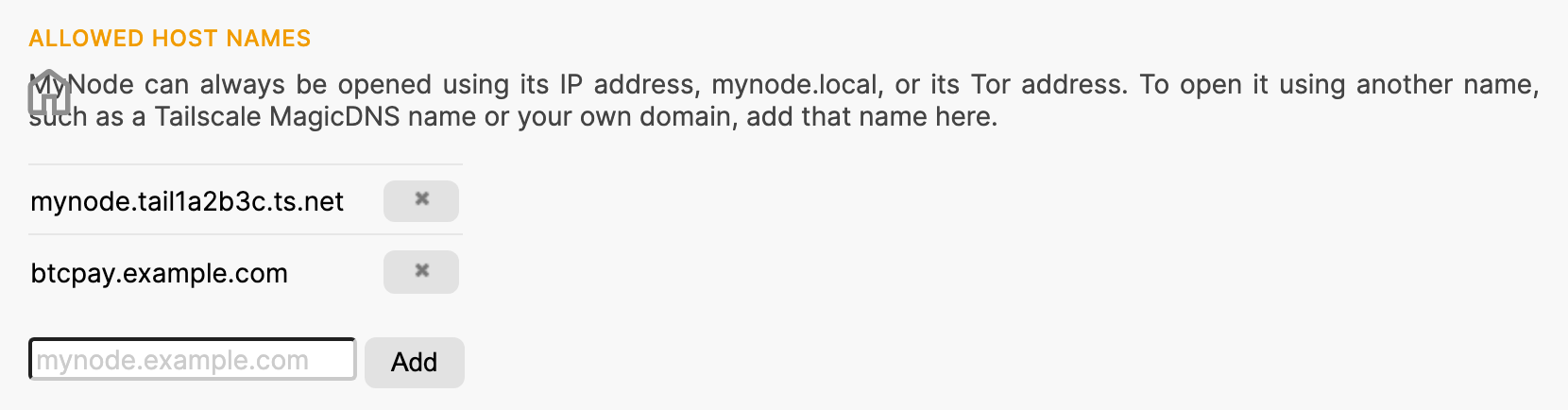
Enter just the name, without https://, a port number, or a path. Each name must be added exactly; wildcards such as *.example.com are not supported. IP addresses and .onion names are always allowed, so they don't need to be added.
To remove a name, click the X button next to it.
# Which apps use this list
The list applies to the MyNode web interface, every app you open through it, and these apps that have their own login:
- BTCPay Server
- LNbits
- LND Hub
- Mempool
- Nostr RS Relay
- Public Pool's web interface
- Sphinx Relay
- JoinMarket Orderbook
It does not apply to services that are not web pages, such as Electrum Server, Bitcoin RPC, LND's gRPC and REST APIs, Lightning P2P, Public Pool's mining ports, or SSH. Their clients connect the same way as before.
# Reaching MyNode from outside your home
Adding a name only lets MyNode answer to it. It does not make anything reachable from the internet. To reach a service by your own domain from outside your home, the service must also accept connections from any address. See Choosing Which Services Are Reachable From the Internet.