
# Choosing Which Services Are Reachable From the Internet
# Overview
MyNode's firewall decides which addresses can connect to each service running on your device. Every service and app is reachable from your local network. Only a few, the ones built to be used from outside your home, also accept connections from any address on the internet.
Local network means these address ranges:
| Range | Used by |
|---|---|
192.168.0.0/16, 10.0.0.0/8, 172.16.0.0/12 | Home routers, MyNode's VPN clients, and Docker apps on the device |
100.64.0.0/10 | Tailscale |
So if you reach your MyNode from home, over MyNode's VPN, over Tailscale, or over Tor, you don't need to change anything here. Tor connections arrive on the device itself and are not affected by this setting.
# Services that accept connections from any address by default
| Service | Ports |
|---|---|
| Bitcoin P2P | 8333, 18333 |
| Lightning P2P | 9735 |
| Lightning Watchtower | 9911 |
| Electrum Server | 50001, 50002 |
| VPN | 51194 |
| BTCPay Server | 49392, 49393 |
| LNbits | 5000, 5001 |
| LND Hub | 3000, 3001 |
| Nostr RS Relay | 5050, 5051 |
| Sphinx Relay | 53001 |
| Public Pool (mining ports) | 3333, 3334 |
Everything else, including the MyNode web interface, SSH, Bitcoin RPC, LND's gRPC and REST APIs, Mempool, RTL, and Thunderhub, accepts connections from the local network only.
TIP
This setting does not open anything on your router. A service is reachable from the internet only if it is selected here and you forward its port on your router (or your router does it with UPnP). Selecting a service without forwarding its port changes nothing outside your home.
# Changing the setting
Open the Settings page and scroll to the Firewall section. Under Reachable From the Internet, click Show Config.

The table lists each service, its ports, and an Any Address checkbox. A checked service accepts connections from any address; an unchecked service accepts connections from the local network only.
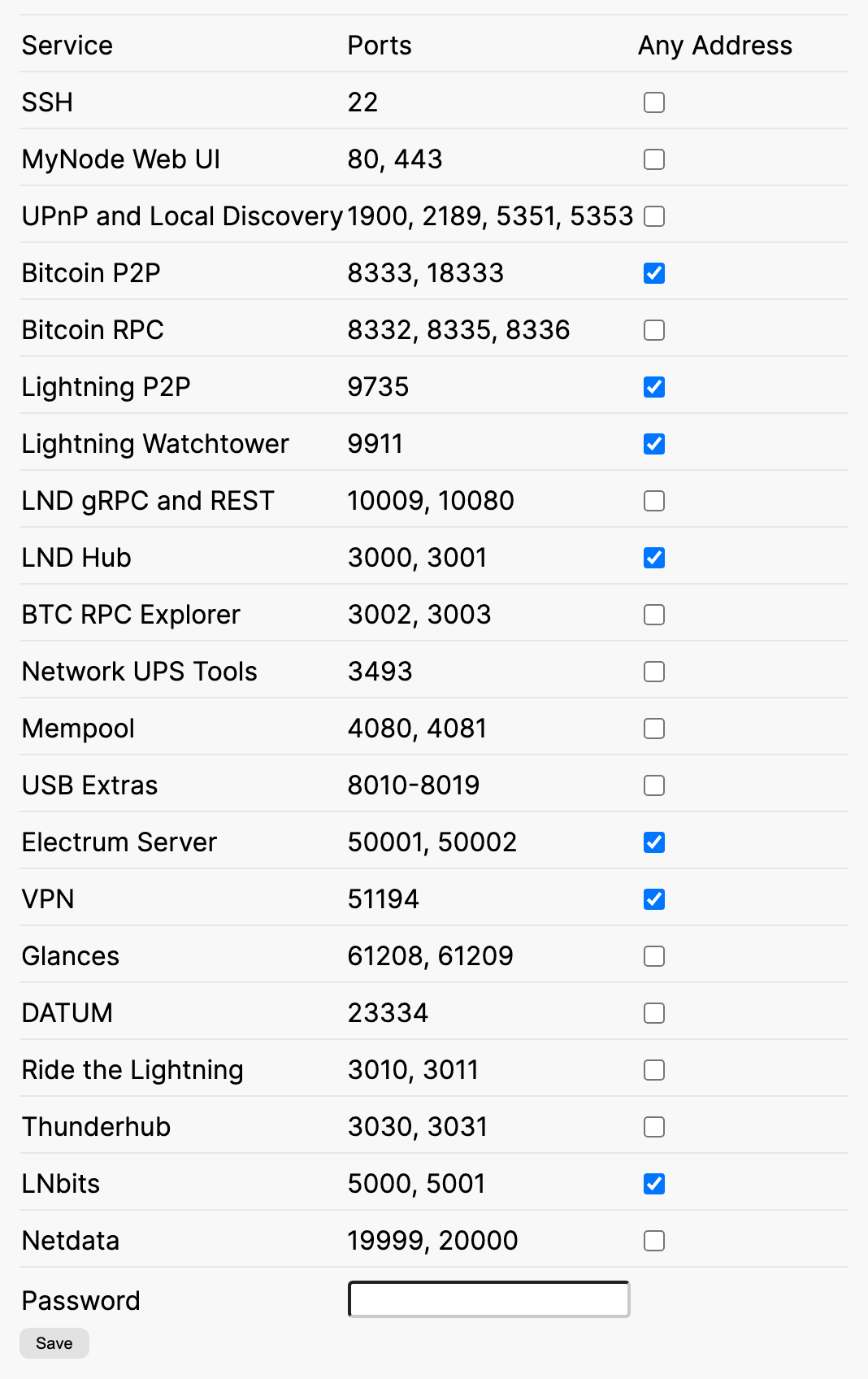
Check or uncheck the services you want, enter your MyNode password, and click Save. The firewall is updated within a few seconds. No reboot is needed.
Only select a service if it is built to be exposed to the internet, or if you need to reach it without Tor, a VPN, or Tailscale. Remember that anything you select and forward on your router can be found by anyone who scans your public IP address.
A few details:
- Only installed apps are listed. An app you uninstall keeps its setting, so it comes back the same way if you install it again.
- Services you never change follow MyNode's default, which may change in a future version. Services you change keep your choice.
- Reset Firewall, in the same section, reloads the current rules. It does not change your choices.
- Allow All Local Network Traffic, also in the same section, is a separate setting. It opens every port on the device to the local network. It does not make anything reachable from the internet.
- Firewall Rules > Show displays the rules currently in effect.
# After upgrading from an earlier version
Earlier versions of MyNode accepted connections from any address on every service port. After upgrading, only the services listed above do.
If you forwarded a port on your router to reach a service that is not on that list, for example Mempool or RTL, it stops working from outside your home after the upgrade. Either select it under Reachable From the Internet, or switch to reaching it over Tor, MyNode's VPN, or Tailscale.